Photos
How to add a watermark to a photo
A mark nobody can read is useless; a mark that hides the product is also useless. You will stamp text or a logo in this tab and check it at 100%.
This tool adds a mark. It will not remove someone else's watermark. Open it when the photos are on disk. Nothing is uploaded.
Open ID Watermark & RedactContents
Decide text vs logo, corner vs tiled
Shop listings often tile a diagonal name. A single corner mark is quieter for a portrait. Do not copy another shop's mark.
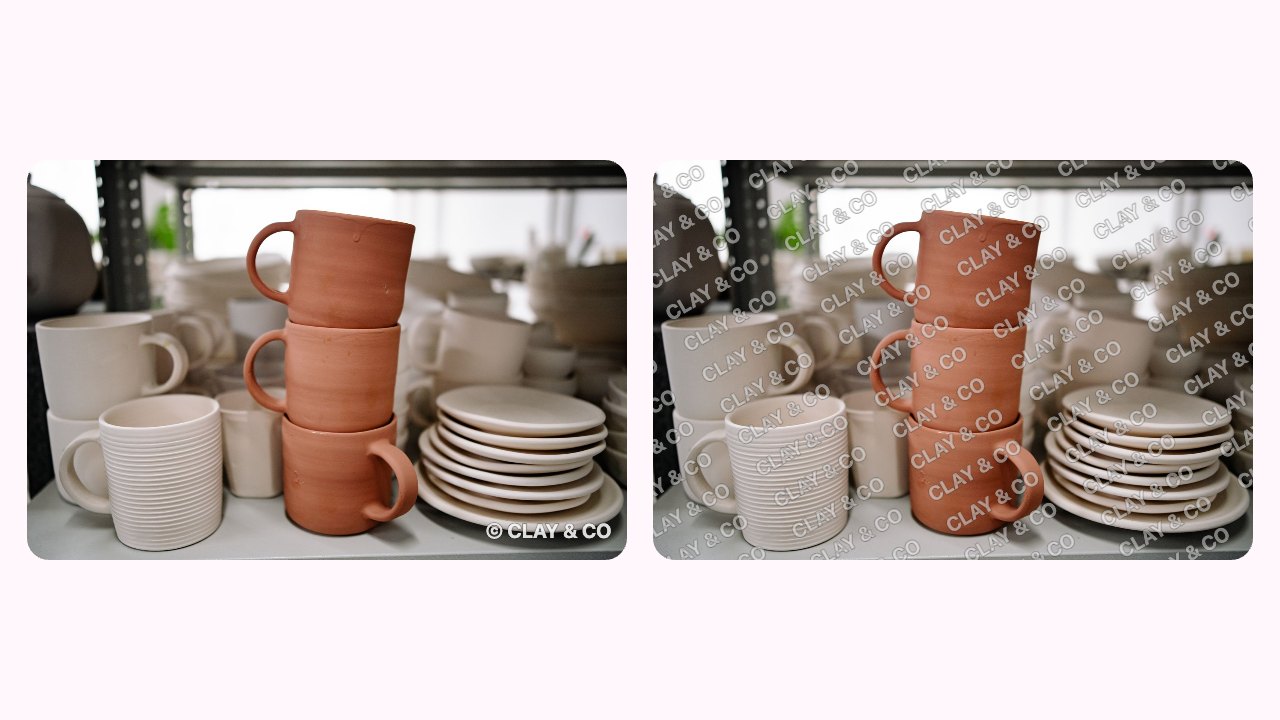
Left: one corner mark, easy to crop off. Right: tiled diagonal, harder to remove. Open watermark on cv.cm
Work stays in this tab. Batch is allowed.
Open ID Watermark & RedactDrop one photo or a batch
Keep the unmarked originals. You are making copies.
Type the name or drop a logo, then set opacity
High enough to read on a busy photo. Low enough to see the product. Tile if a corner mark is easy to crop off.

Opacity from low to high: the left vanishes, the right covers the product. Aim for the middle. Download PNG, JPEG, or a ZIP
JPEG is smaller for shop listings. PNG if the mark has a clear background.
Open at 100%
If the mark vanishes on a busy photo, raise contrast or tile it. If it hides the product, lower opacity.
FAQ
How do I add a watermark without Photoshop?
Drop photos on cv.cm watermark in this tab. Type text or a logo, download. Nothing is uploaded.
Can I watermark a batch of shop photos?
Yes. Drop several, set one mark, download a ZIP.
Will this remove a watermark?
No. This lesson only adds a mark. Removing someone else's mark is a different, often unwelcome, job.
Are photos uploaded?
No. Closing the tab discards them.
Should I tile or use a corner?
Tile if someone might crop the corner. A single corner is quieter on a portrait.