Audio
How to tune a guitar
Your guitar sounds off, or it is your first time tuning. You will set up the tuner, play one string at a time, and turn the pegs until each is within ±5 cents. It listens through your microphone, and nothing is recorded or uploaded.
New strings and big temperature changes make a guitar drift, so a second pass is normal, and new strings may need several.
Open Guitar tunerContents
Learn the six strings
Standard tuning from the thickest string to the thinnest is E A D G B E. The thickest is low E (about 82 Hz), and the thinnest is high E (about 330 Hz), two octaves higher.
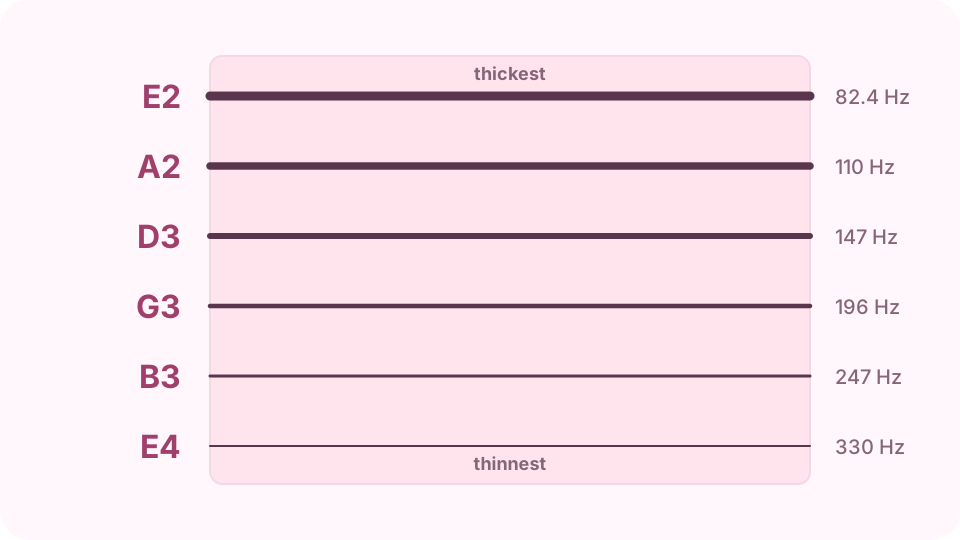
Thickest to thinnest: E A D G B E, each with its target pitch. Open the Guitar tuner on cv.cm
Press Start tuner and allow the microphone when the browser asks. Instrument defaults to standard guitar. Move to a quiet room and hold the guitar close to the microphone.
Open Guitar tunerPlay one string and read the meter
Leave Auto on, then pluck one string and let it ring. The page shows the closest string's note and how many cents off it is. In tune means within ±5 cents; a cent is one hundredth of a semitone.
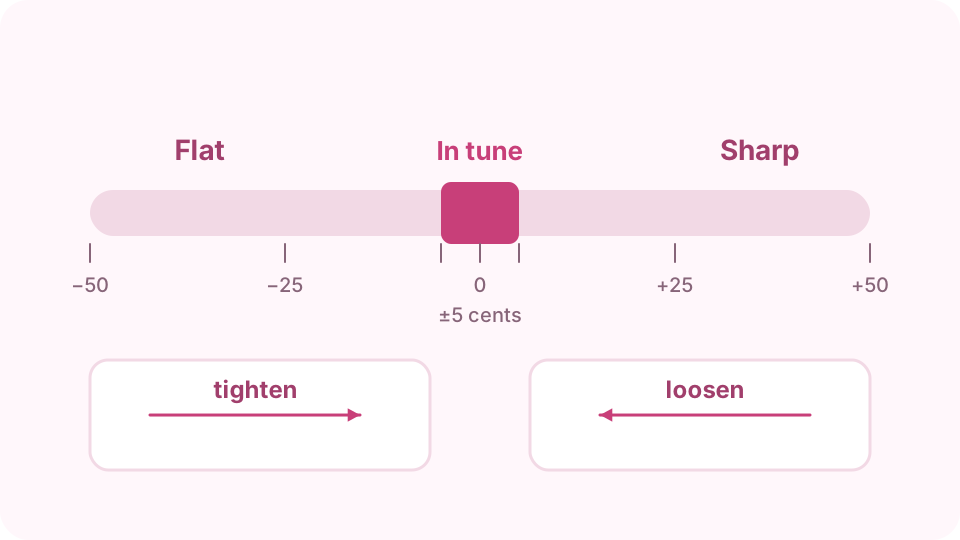
Left of centre is flat, right of centre is sharp, and ±5 cents counts as in tune. Turn the peg the right way
Flat means too low, so tighten the string. Sharp means too high, so loosen it. Turn slowly and pluck again, because a small turn moves the pitch quickly, especially on the thin strings.
Tune up to the note
If a string is sharp, loosen it below the note and come back up. The string then holds its pitch better, because no slack is left at the peg. Do the same for all six strings.
Check again, or change the tuning
Pulling one string slightly changes the others, so go through them all again. If Auto jumps between strings, tap one to lock onto it. Instrument also has drop D, DADGAD, open G, bass, ukulele, violin and cello.
FAQ
Why does the tuner show a different note from the string?
Auto follows the closest string, so a string far from its target can read as its neighbour, and an overtone can do the same. Tap the string you want to lock onto it, then pluck softly and tune up gradually.
Why does the reading jump around?
Noise and other ringing strings confuse the pitch reading. Mute the other strings with your hand, pluck with the soft part of your thumb, and read it just after the first attack.
What does 440 Hz mean?
It is the standard pitch of the note A above middle C. Leave Reference A4 at 440 unless you are matching a piano or a recording tuned to something else.
Can I tune without a microphone?
Yes. Tap the string you want, then press Play reference to hear its note and match the string by ear. Listen for the slow beats between the two sounds, and turn the peg until they stop.
How often should I tune?
Every time you play. Check it again after you put on new strings or move between hot and cold rooms, because both change the tension in the strings.