You have a ROM file and want to play it without installing anything. You will open it in the browser, check the console, learn the keys and save your progress. The file stays on your device.
5-minute read
Today's result Your game running in a browser tab, with its keys in front of you and a save state on your device.
Use ROMs you have the right to use, such as homebrew released by its author. cv.cm does not provide commercial ROMs.
A ROM is a copy of a game cartridge in one file. This tool opens FC / NES, SFC / SNES, Game Boy, Game Boy Color, Game Boy Advance and Mega Drive / Genesis games. cv.cm's Games column has free homebrew if you have no file.
Open the ROM emulator on cv.cm
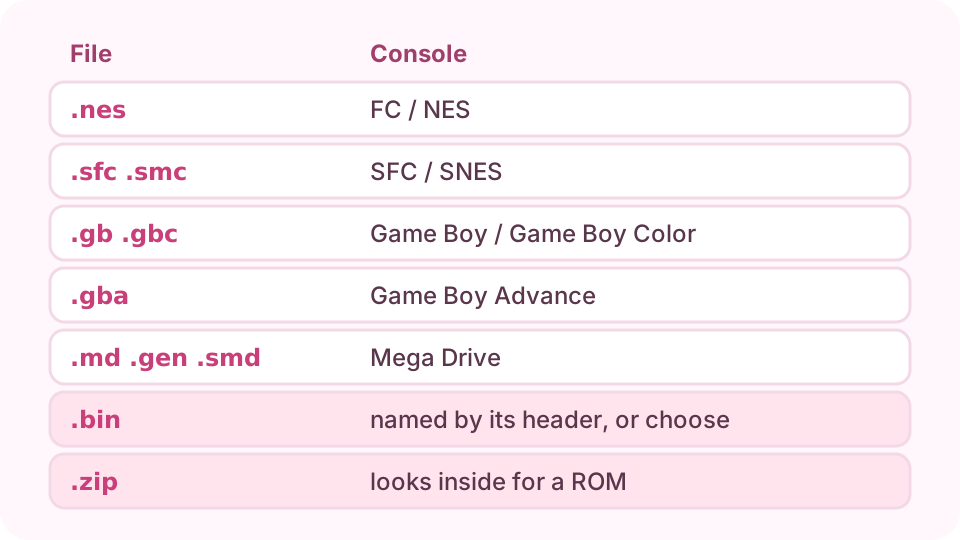
Press Choose ROM and pick a .nes, .sfc, .smc, .gb, .gbc, .gba, .md, .gen, .smd, .bin or .zip file. It is read in this tab and not sent anywhere. The first start also downloads the emulator, so give it a moment.
The line under the game says which console was detected. If the file does not say, or the game looks wrong, choose one under Console and the game starts again on it. Game Boy and Game Boy Color share one emulator core, so switching between those two does not restart the game.
Learn the keys
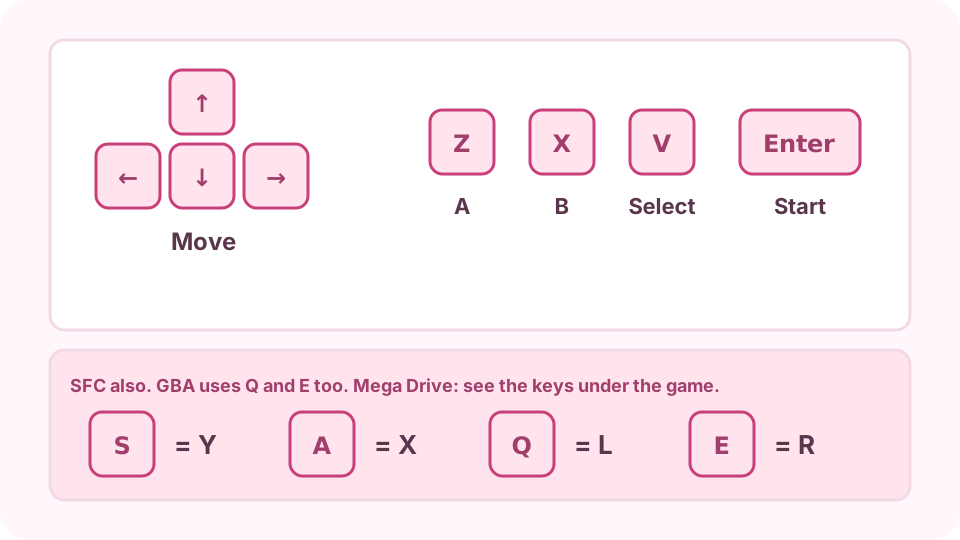
The keys for that console appear under the game. On most consoles the arrow keys move, Z is A, X is B, V is Select and Enter is Start. On a phone, use the on-screen pad. A Bluetooth gamepad works too.
The keyboard keys for most consoles, and what SFC adds.
Save your game
Move the pointer over the game to show the toolbar. On a phone, tap the three-line icon at the top right. The floppy disk icon saves a state and downloads it as a .state file. The folder icon loads one. Keep the file: it brings you back to this exact spot after you close the tab.
Fix a game that will not start
A black screen usually means the wrong console, so try another under Console. A zip must hold a ROM directly, not another zip. Files over 64 MB are refused, because they are too big for these consoles, and disc games are not supported.
No. The file is read in this tab and handed to the emulator on the page. Only the emulator itself is downloaded.
Is it legal to play ROMs?
It depends on the game and on where you live. Homebrew that its author released freely is fine. Rules for copies of commercial games differ by country, so check yours.
Which file should I choose from a zip?
Choose the zip itself. The tool looks inside it for a ROM and the emulator opens it. If the zip holds a .bin, choose the console yourself.
Can I play PlayStation or Nintendo DS games?
No. This tool covers FC / NES, SFC / SNES, Game Boy, Game Boy Color, Game Boy Advance and Mega Drive / Genesis.
Where do my saves go?
The floppy disk icon downloads a .state file to your device. To continue later, open the same ROM and load that file with the folder icon. Saves made in the game's own menu may stay in this browser until site data is cleared, so keep a .state file for anything you care about.